Enable Debug Mode
The Debug Mode feature in WOVN streamlines app development and testing by enabling App Operator Mode. This mode provides faster reporting/translation updates while ensuring user privacy when combined with the Limit reporting to only app operator setting.
Key Benefits
- Accelerated Feedback Cycle: Enables rapid reporting and re-translation during development (updates every ~10 seconds).
- Privacy Protection: Prevents end-user data transmission to WOVN when used with privacy restrictions.
Feature Overview
Enabling Debug Mode activates App Operator Mode with:
-
Frequent Updates
Content re-translation and data reporting every 10 seconds for rapid feedback. -
Privacy Safeguards
Restricts data reporting exclusively to app operators in debug environments.
Activation Methods
Method 1: Programmatic Activation
Enable Debug Mode through code using the start method. Pass true to isDebugMode to enable Debug Mode. Common approaches include:
Option A: Using Build Configuration Check _isDebugAssertConfiguration()
Wovn.start(isDebugMode: _isDebugAssertConfiguration())
Example Implementation (Swift):
class AppDelegate: UIResponder, UIApplicationDelegate {
    func application(_ application: UIApplication, didFinishLaunchingWithOptions launchOptions: [UIApplication.LaunchOptionsKey: Any]?) -> Bool {
        // ...
        // Using internal configuration check
        Wovn.start(isDebugMode: _isDebugAssertConfiguration())
        // ...
    }
}
Option B: Using Standard #if DEBUG Directive
class AppDelegate: UIResponder, UIApplicationDelegate {
    func application(_ application: UIApplication, didFinishLaunchingWithOptions launchOptions: [UIApplication.LaunchOptionsKey: Any]?) -> Bool {
        // ...
        #if DEBUG
            Wovn.start(isDebugMode: true)  // Debug builds
        #else
            Wovn.start(isDebugMode: false) // Production builds
        #endif
        // ...
    }
}
Build Configuration Notes
_isDebugAssertConfiguration()internally checks Xcode'sDEBUGflag configuration#if DEBUGis the standard Swift preprocessor directive for:
truein debug builds (development/testing)falsein production releasesBoth methods automatically separate environments without manual configuration.
EnsureDEBUGflag is set in your target's build settings for debug schemes.
Method 2: WOVN Settings Screen
Enable through the app interface after initial setup:
- Navigate to Settings → your application
- Enter your WOVN token in Validation Token
- Toggle Debug Mode switch ON
For setup details, see WOVN Settings Integration Guide.
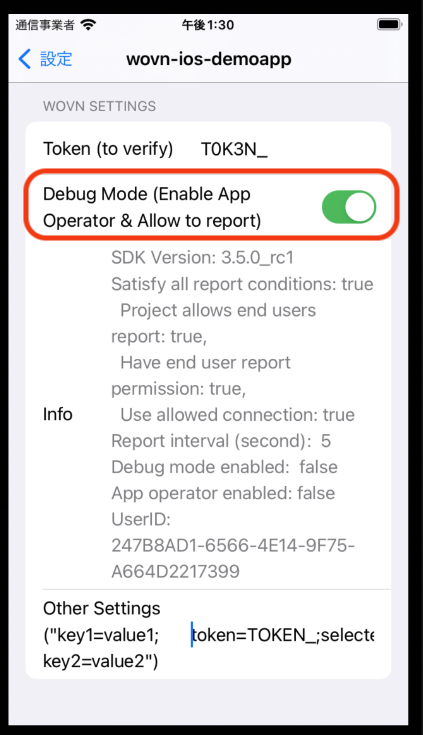
Verification (From v3.5.0)
Check activation status programmatically:
let debugStatus = Wovn.getDebugStatus()
// Returns human-readable status including Debug Mode state